Know who is coming in today, and never overbook a slot.
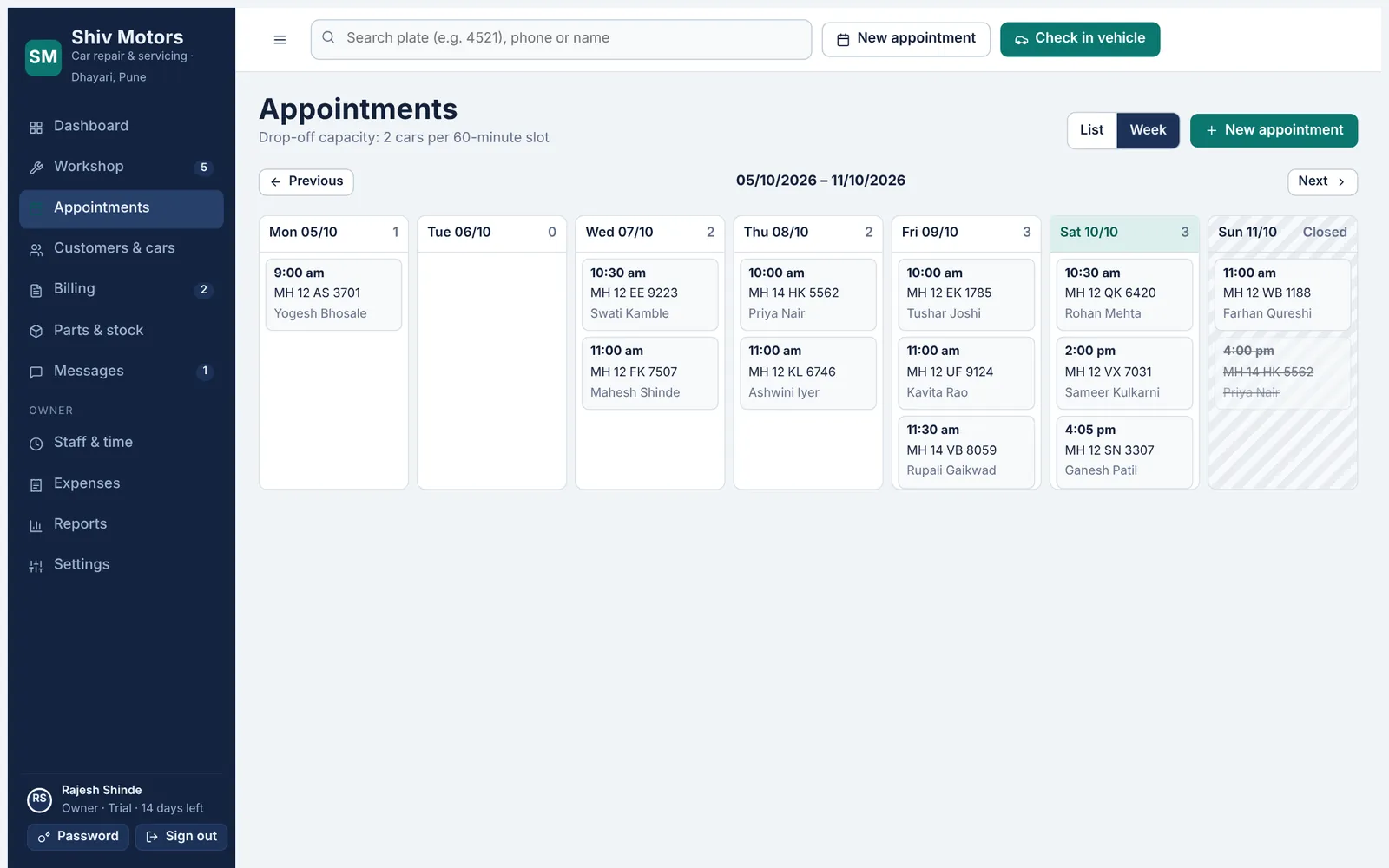
Book cars by day or week against your real working hours. Set how long a slot is and how many cars you can take at once, and the calendar warns you before you overbook. Share your online booking link and customers can pick a free slot themselves; the request lands in your calendar straight away.
Day and week views. See every booking with the car, the customer and the reason for the visit.
Slot capacity. Set slot length and cars per slot. Full slots are flagged before you save.
Working hours. Closed days and opening hours are respected by the calendar and the booking link.
Online booking link. Customers choose a service, date and free time on their phone. No account needed.
Record the car’s condition before anyone touches it.
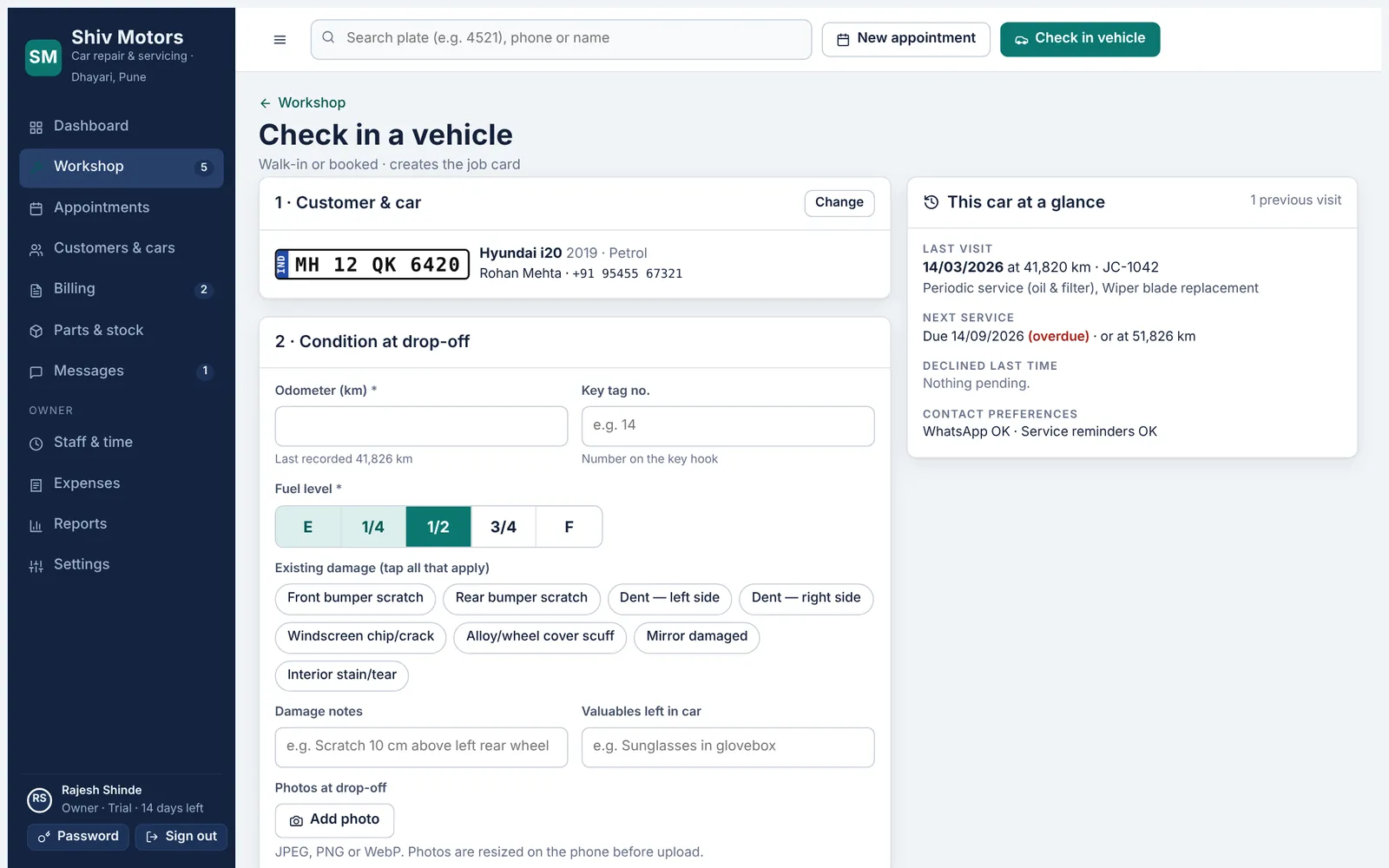
Find the car by the last four digits of its plate, the mobile number or the name. Record the odometer, fuel level, existing damage, valuables and photos, write the complaint in the customer’s own words, set the promised delivery time and assign mechanics. The car’s history sits next to the form so you see last visit, overdue service and work they declined last time.
Fast search. Type 4 digits of the plate or part of the phone number. New customer and car are added in the same form.
Condition at drop-off. Odometer, fuel gauge, damage chips, damage notes and valuables left in the car.
Photos. Take photos on the phone. They are resized before upload to save data.
Promised time. Set the delivery date and time. Late jobs are flagged on the dashboard.
The whole story of every car, searchable in a second.
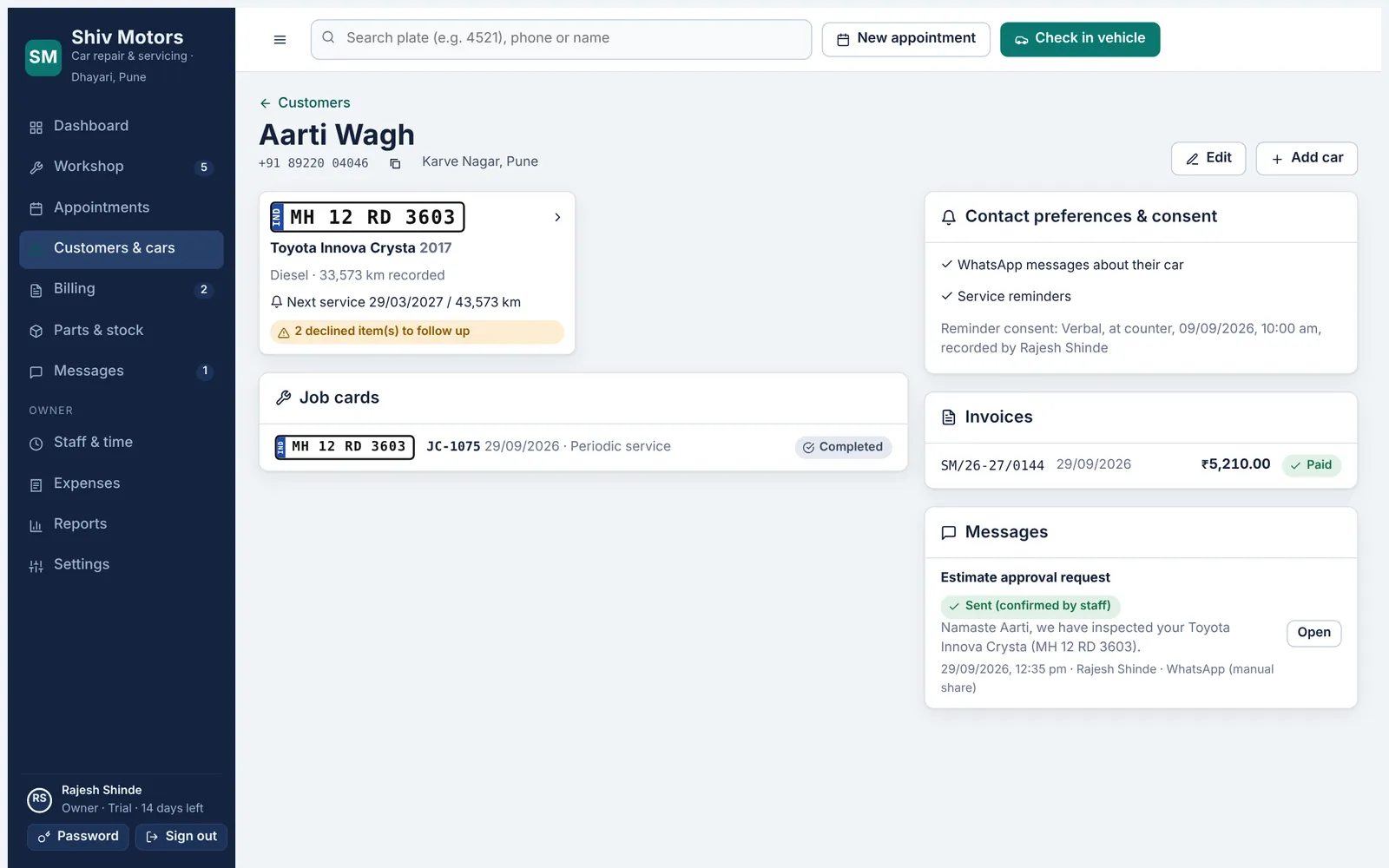
Each customer can have several cars, and each car keeps its full service history: job cards, invoices, odometer readings, next service due and work the customer declined. Search by name, mobile number or any part of the plate. Bring your existing customer list in from a CSV file; the app checks for duplicates and shows a preview before anything is saved.
Search anything. Name, mobile number or part of the registration number.
Several cars per customer. Each with make, model, year, fuel, VIN and odometer history.
Declined work follow-up. Items the customer said “not now” to are kept on the car and shown at the next visit.
Consent recorded. Whether they agreed to WhatsApp reminders, when and how, is stored with the customer.
Turn what the mechanic sees into an estimate the customer trusts.
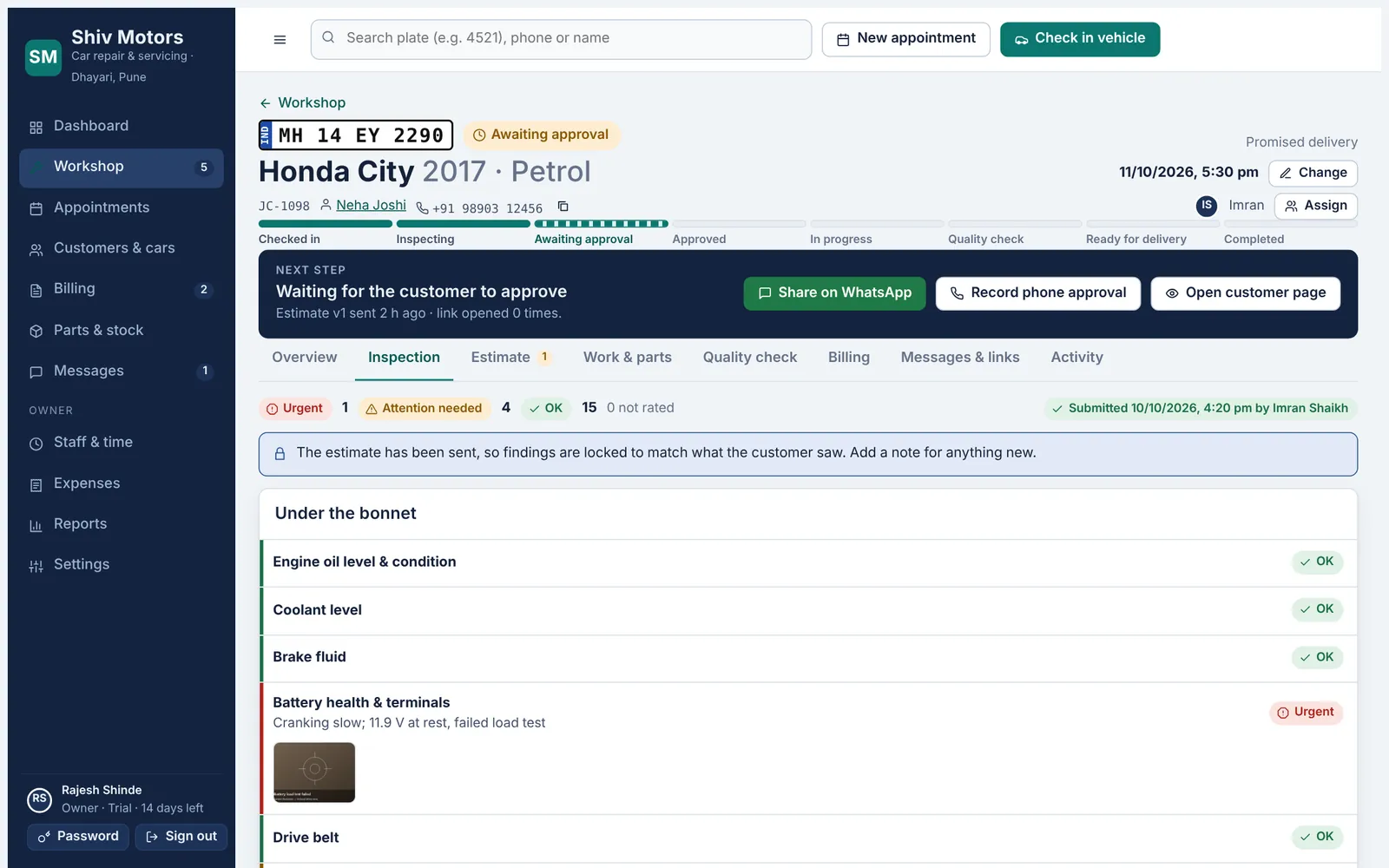
Mechanics work through a checklist on their phone, section by section, and rate each item OK, Attention or Urgent with big buttons. An issue needs a short note, and photos can be added. “Mark the rest OK” finishes a clean section in one tap. When the inspection is submitted, the findings become estimate lines and the customer sees the same findings, photos included.
Checklists by car type. A standard checklist and an EV checklist are included. Add or edit your own in Settings.
Three clear ratings. OK, Attention and Urgent, with colour and icon so nobody misreads them.
Notes and photos. Every issue needs a note; photos show the customer exactly what was found.
Mark the rest OK. Finish a section in one tap once the issues are recorded.
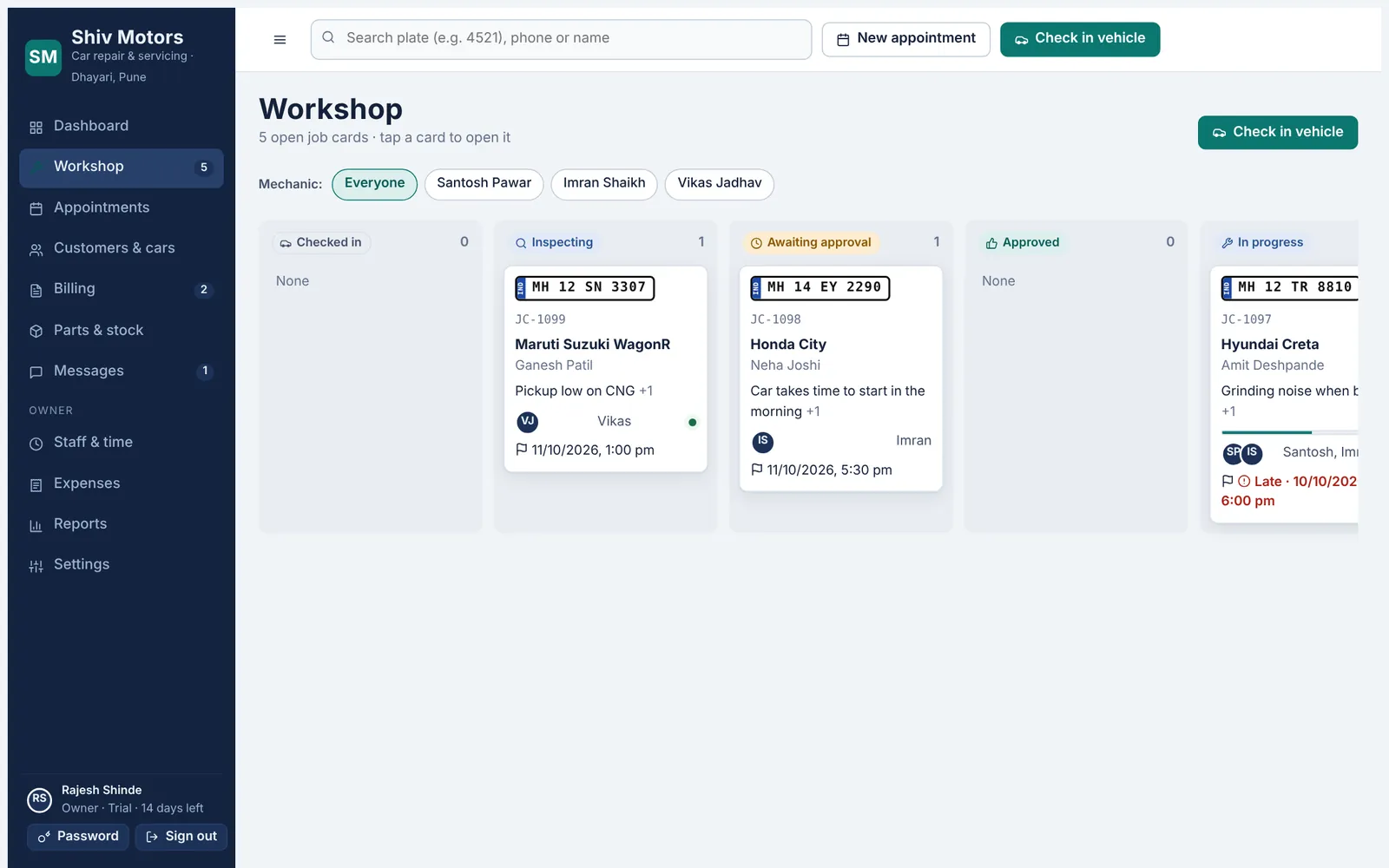
One screen tells you what every car is waiting for.
Each car gets a job card that moves through clear stages: checked in, inspecting, awaiting approval, approved, in progress, quality check, ready and completed. The card always shows the next step and the button to do it. The workshop board groups cars by stage and can be filtered by mechanic, and late jobs are flagged against the promised time.
Clear stages. Eight stages from check-in to handover, shown as a progress bar on every job.
Next step bar. The job card tells you what to do next: send the estimate, record payment, hand over.
Tasks from approved work. Approved estimate lines become tasks; parts are reserved automatically.
Assign mechanics. See how many open jobs each mechanic has before you assign.
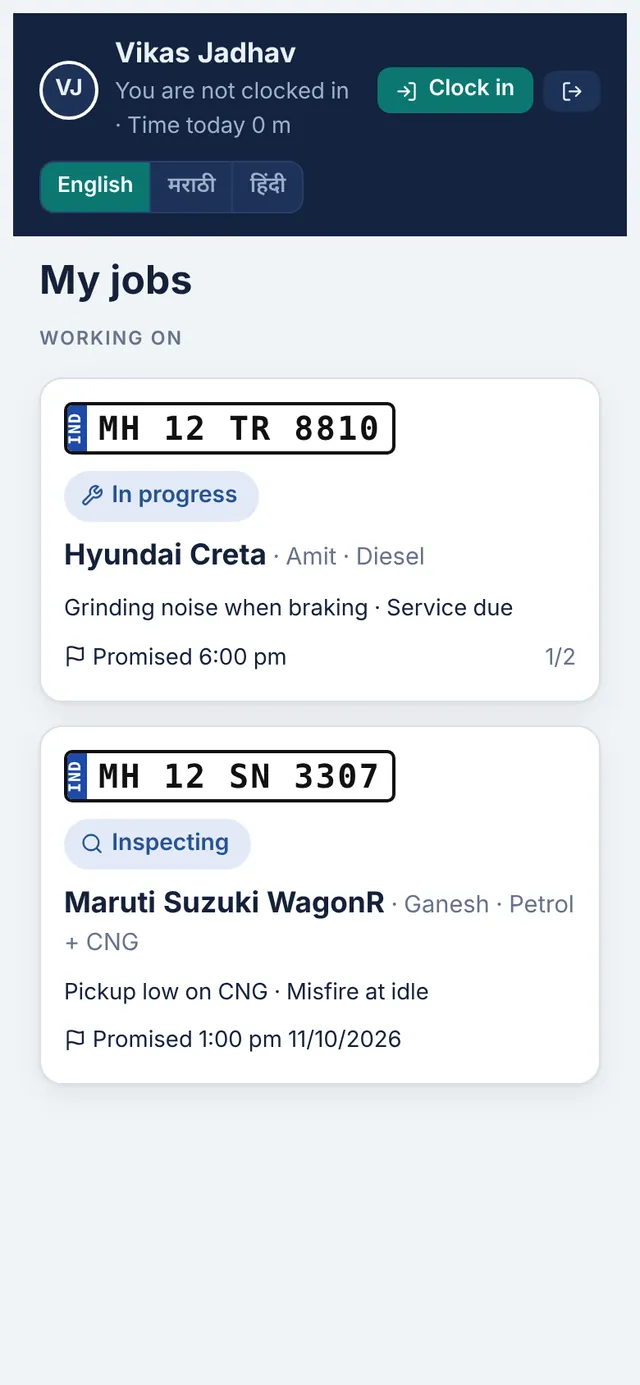
Mechanics sign in on any Android phone with the garage code, their mobile number and a 6-digit PIN. They see only the cars assigned to them, with large buttons for inspections, tasks, parts and timers. They never see prices, costs or customer phone numbers. The whole screen switches between English, Marathi and Hindi with one tap.
PIN sign-in. Garage code, mobile number and a 6-digit PIN set by the owner. No email needed.
Only their jobs. Each mechanic sees the cars assigned to them, with the customer’s first name only.
Big, clear buttons. Inspection ratings, tasks and parts are easy to hit on a small screen.
Three languages. English, मराठी and हिंदी, switchable any time.
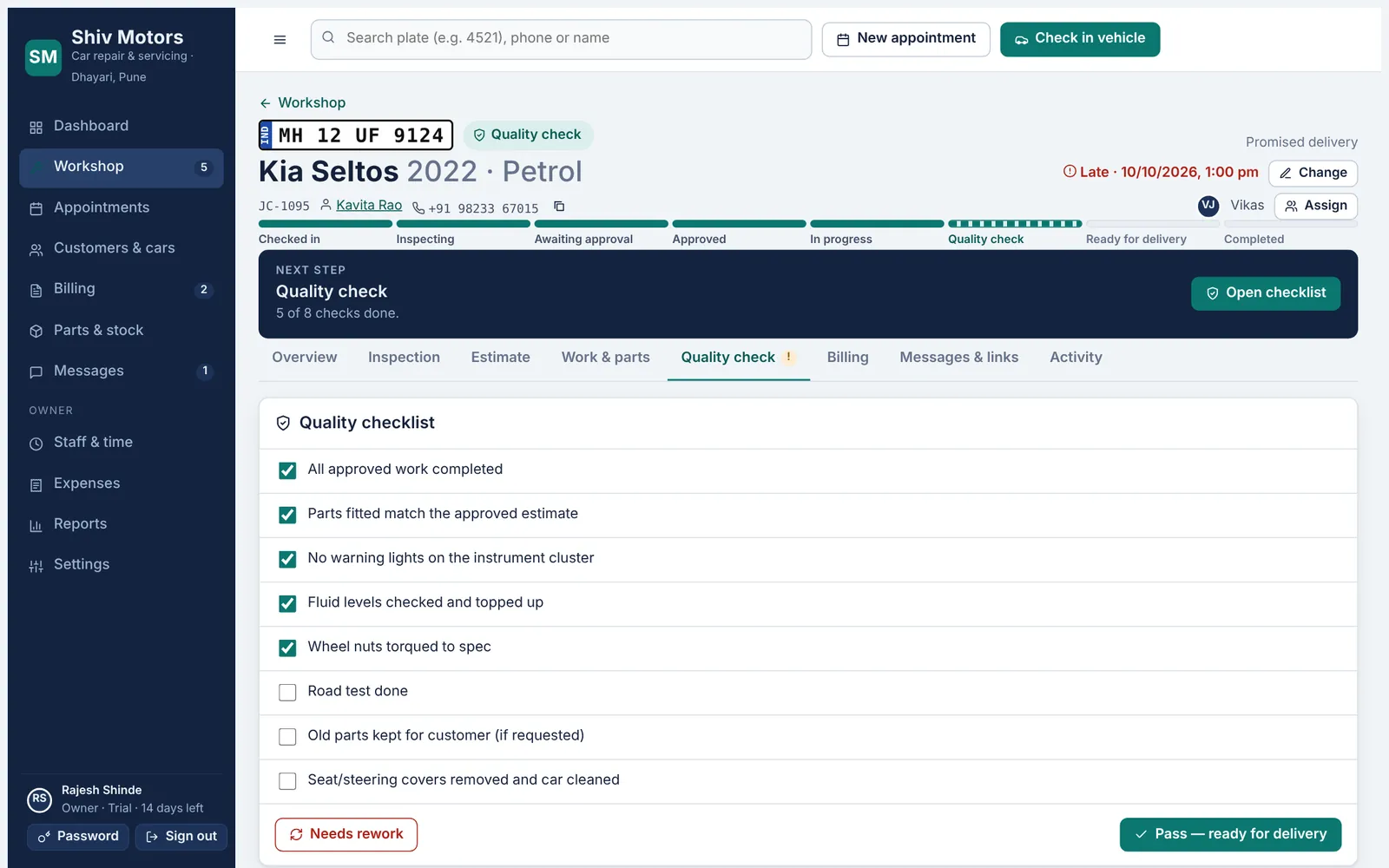
Before a car can be marked ready, every item on your quality checklist has to be ticked: road test, fluids, torque, cleanliness, old parts returned, whatever your garage requires. Failing QC sends the job back with a reason. At handover you record the delivery odometer, and the next service date and kilometres are set for the reminder.
Your own checklist. Edit the quality checklist in Settings to match how your garage works.
Must be ticked. The job cannot move to Ready until every check is done.
Fail with a reason. A failed check goes back to the mechanic with a note.
Ready message. Send the customer a prepared WhatsApp message when the car is ready.
Fewer phone calls, clearer yes and no, and a signature for every approval.
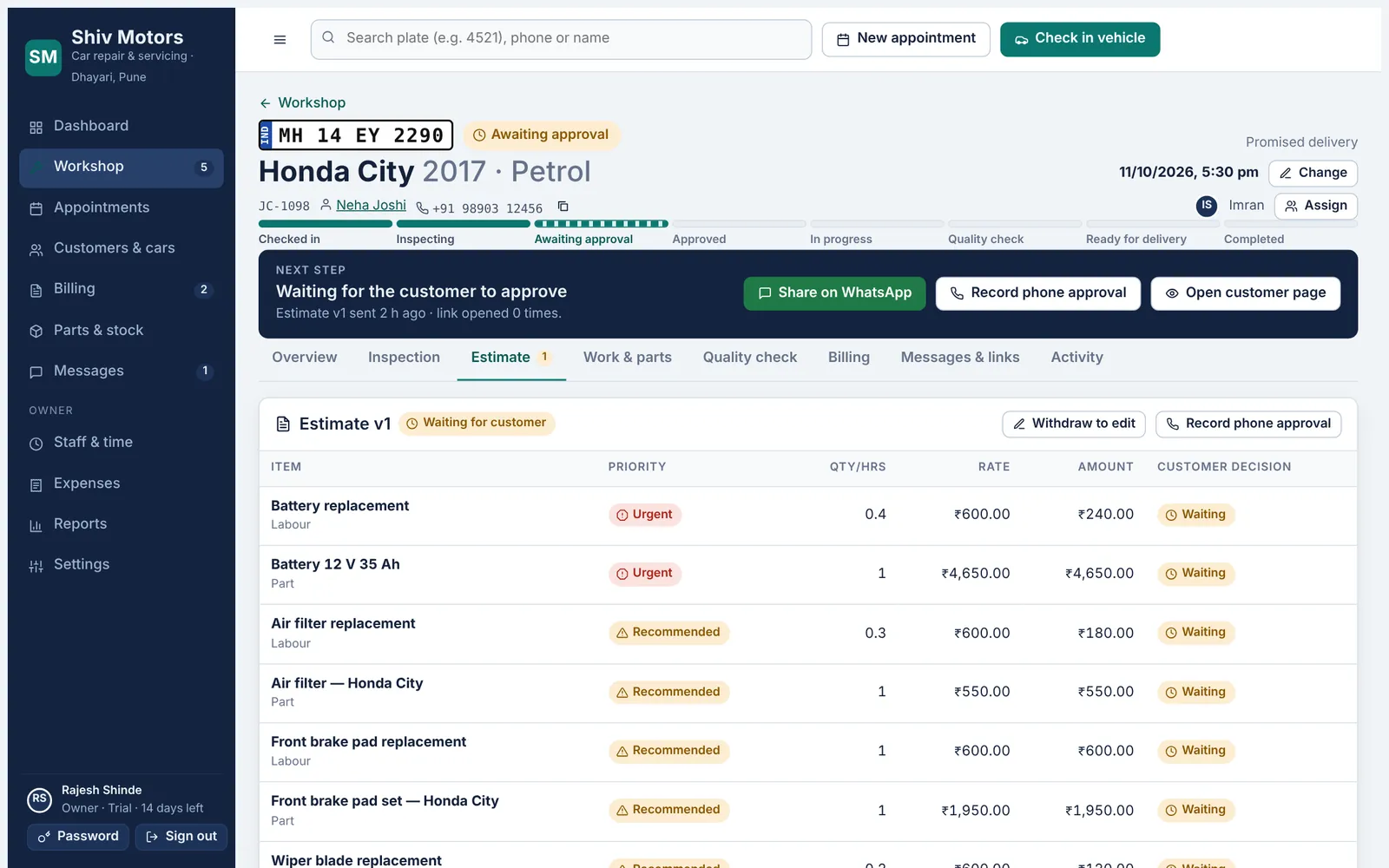
The estimate builds itself from the inspection findings and your service list: labour and parts lines with quantity or hours, rate and discount, each marked Urgent, Recommended or Requested. Send it on WhatsApp with a private link. The customer approves or declines each item and signs on their phone, or you record their approval from a phone call. Declined items are remembered on the car for next time.
Built from findings. Inspection issues and service templates become lines in one tap.
Priorities. Urgent, Recommended and Requested, grouped so the customer understands what matters.
Versions. Withdraw an estimate to edit it; the customer always sees the latest version.
Item-by-item approval. Customers choose Approve or Not now for each item and sign with their finger.
Everything about their car, on their phone, without an app.
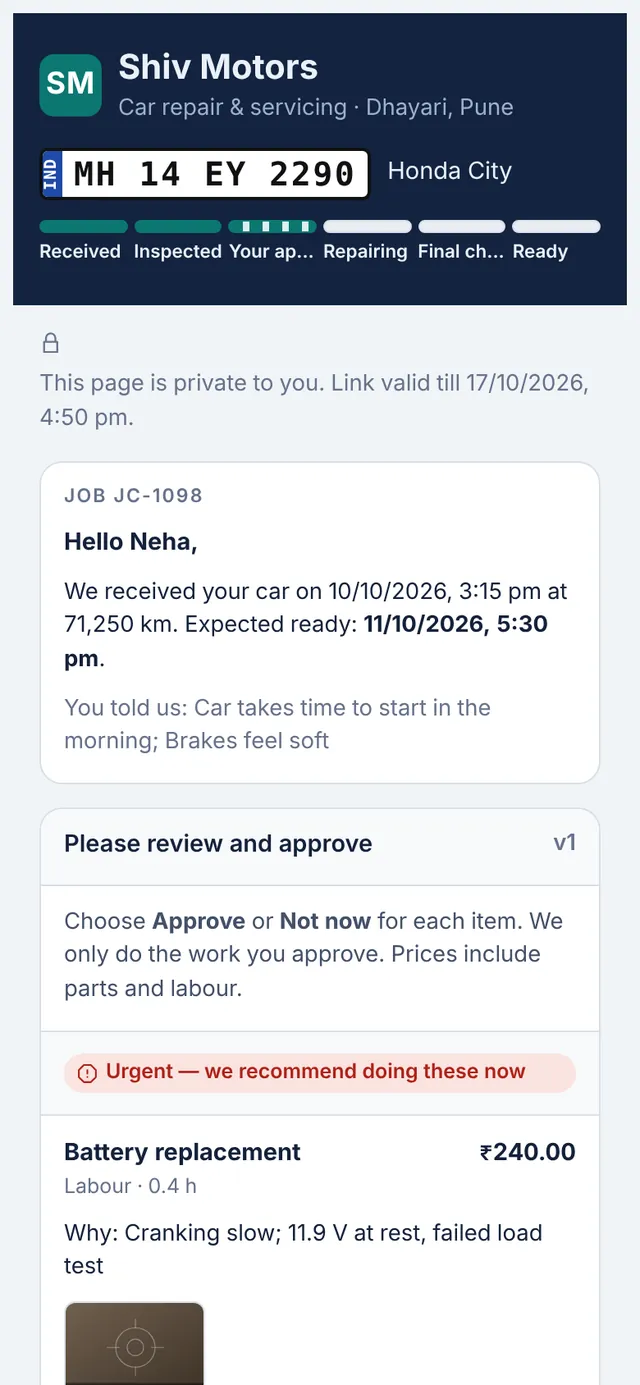
Every job gets a private link for the customer. It shows a progress tracker from received to ready, the complaints you recorded, the estimate to approve with inspection photos, the invoice with a PDF download, and a way to pay: a UPI QR code from your UPI ID, or online payment into your own Razorpay account on the Pro plan.
Progress tracker. Received, inspected, approval, repairing, final check and ready.
Approve with photos. Inspection photos sit next to each estimate item.
Invoice and PDF. The customer can view and download the invoice.
Pay by UPI. A UPI QR code for the balance, generated from your UPI ID.
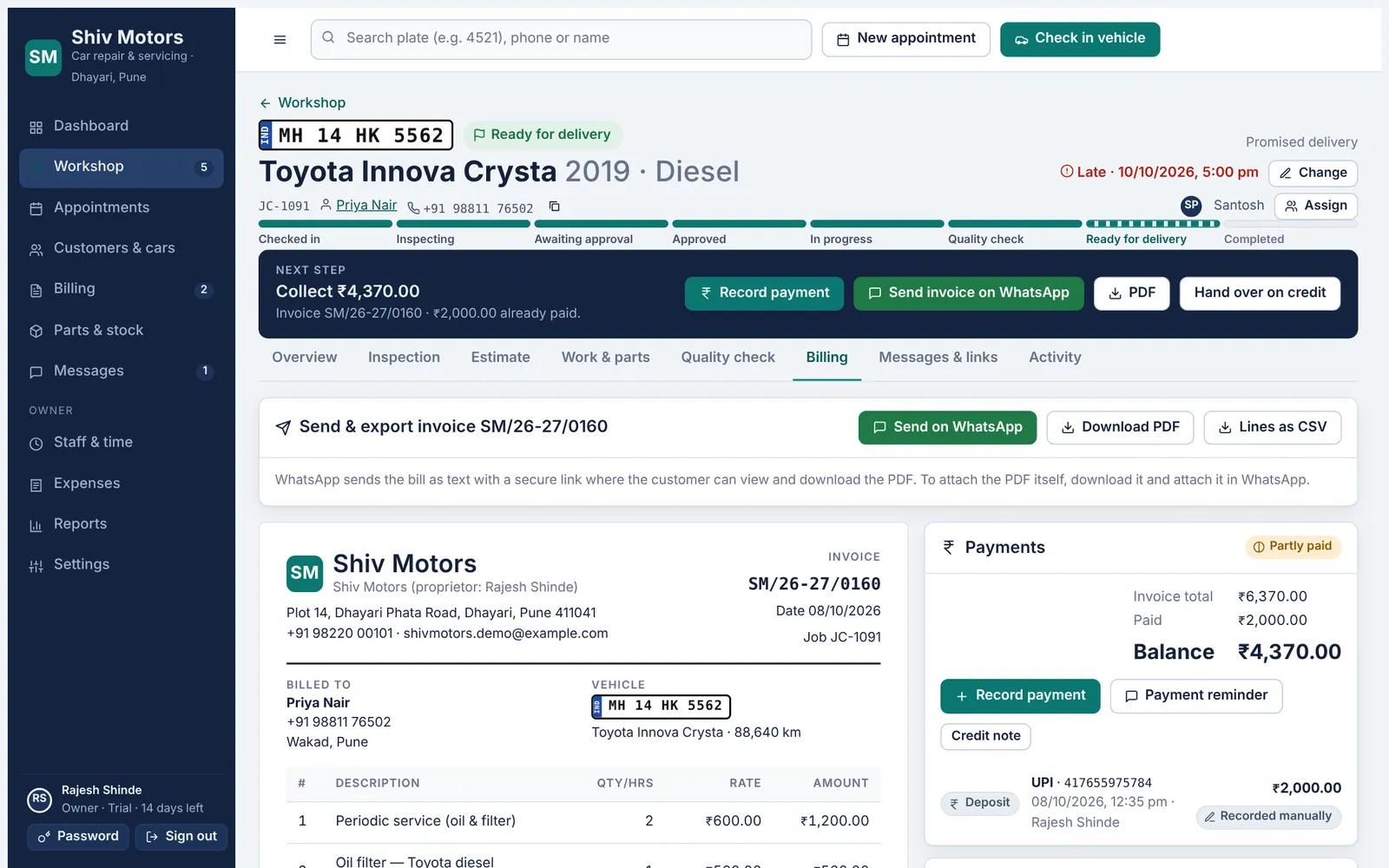
The invoice is built from the approved estimate and the parts actually fitted. Numbering follows your prefix and can restart every April. Once issued, an invoice is locked; corrections are made with a credit note, so your records always add up. Share it on WhatsApp with the customer’s link, download a PDF, or export the lines as CSV.
No retyping. Lines come from approved work and fitted parts.
Your numbering. Set the prefix and starting number, with an optional restart each financial year.
Locked when issued. Issued invoices cannot be edited. Credit notes handle corrections and refunds.
PDF and CSV. Download a clean PDF for printing or attaching, or the lines as CSV.
Know exactly who owes you, and whether the drawer matches.
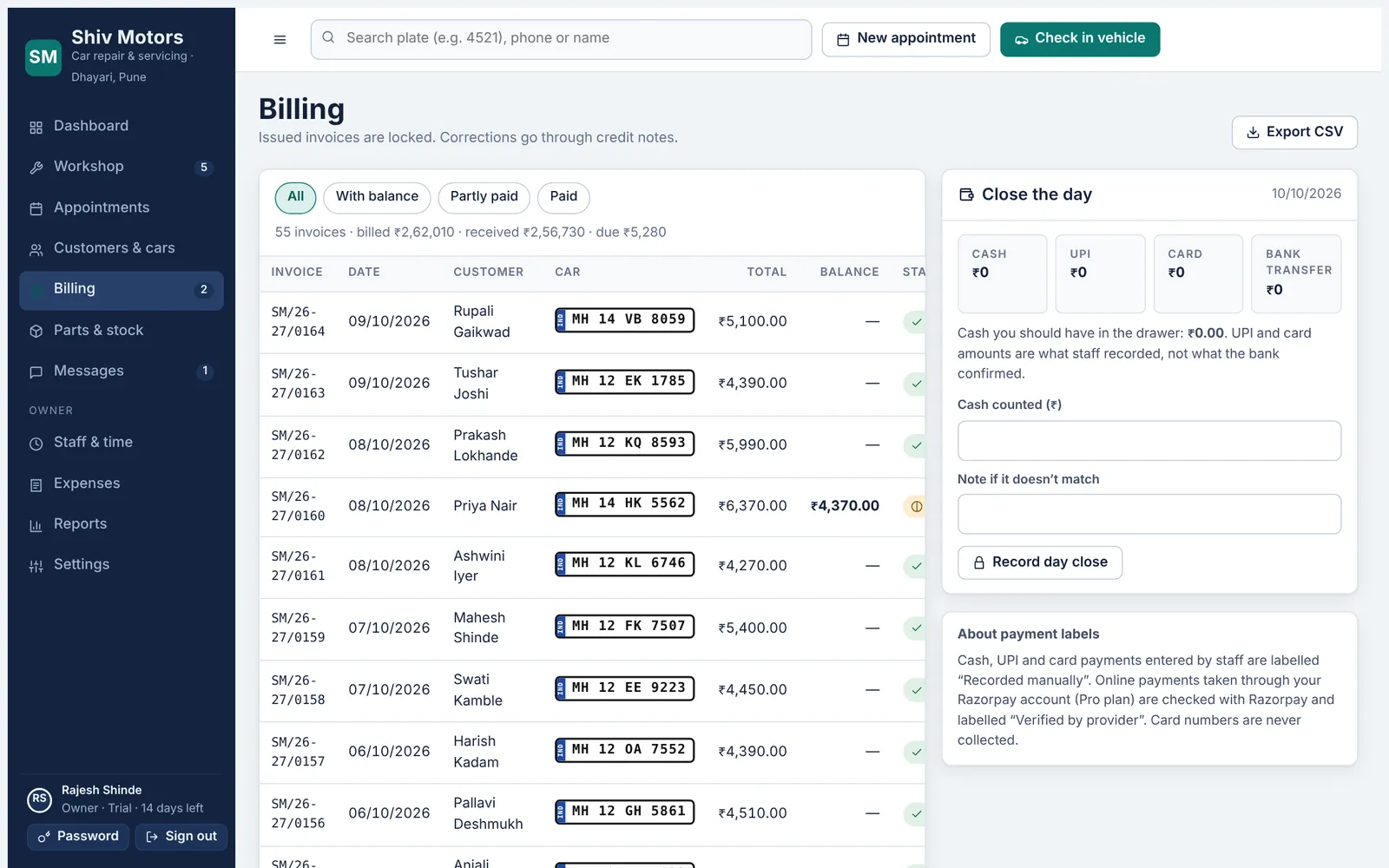
Record cash, UPI, card or bank transfer against an invoice, in full or in parts, with a reference number. Manual payments are always labelled as recorded by staff; online payments through your own Razorpay account (Pro) are marked as verified by the provider. Send payment reminders on WhatsApp, and on the Growth and Pro plans close the day by counting the cash drawer against what was recorded.
Part payments. Take an advance or pay in instalments; the balance updates every time.
Every method. Cash, UPI, card and bank transfer, with the reference number.
Clear labels. “Recorded manually” and “Verified by provider” are never mixed up.
Payment reminders. A prepared WhatsApp message with the balance and the customer’s link.
Stock that adds up, even when two people work at once.
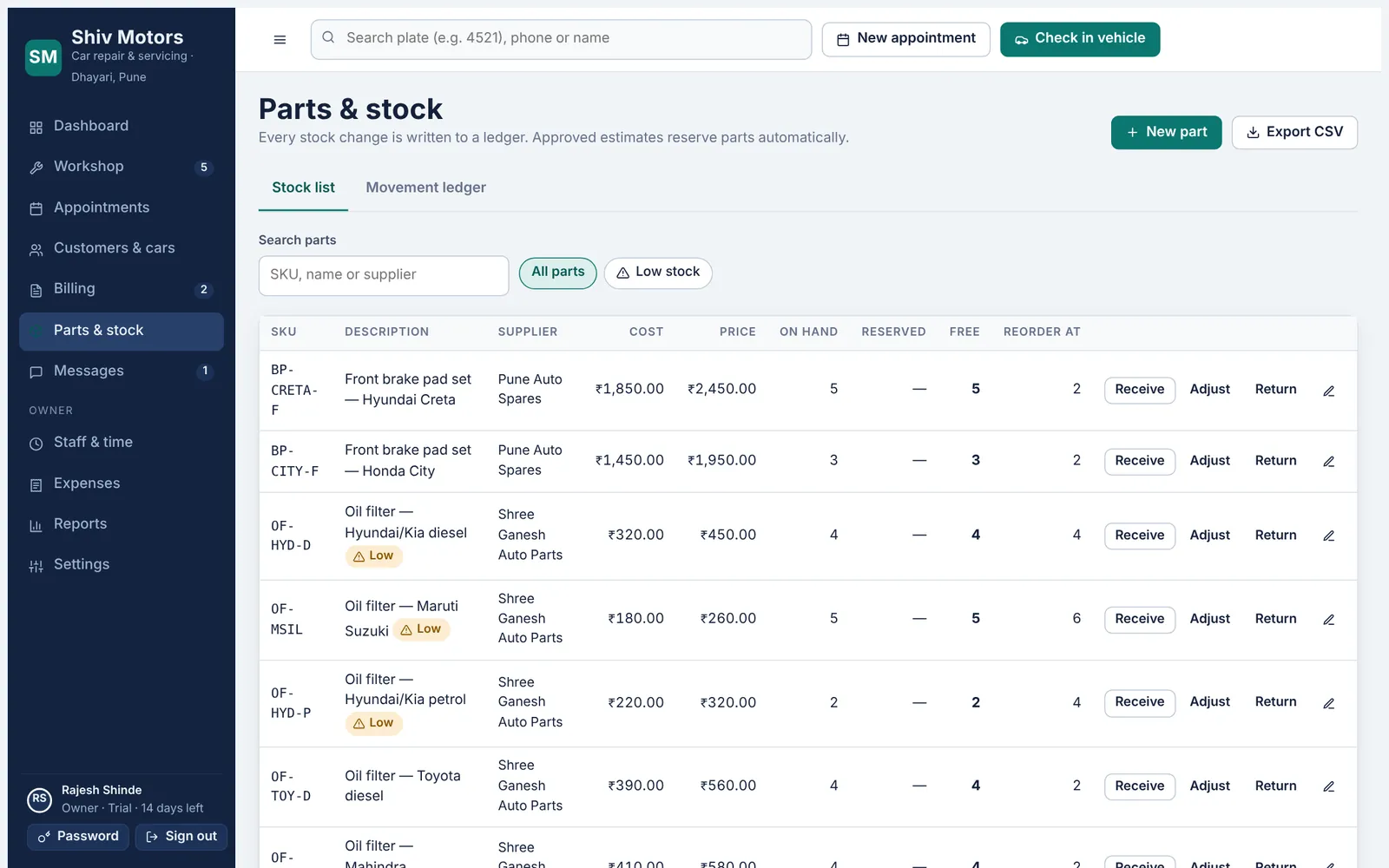
Keep your parts list with part number, supplier, cost, selling price and reorder level. Approved estimates reserve parts, fitting a part deducts it, and every movement is written to a ledger: received, adjusted, fitted, released or returned to the supplier. Low-stock parts show on the dashboard. Stock changes are checked on the server, so two people fitting the last part at the same moment cannot both succeed.
Parts list. Part number, description, supplier, cost, price and reorder level.
Reserved on approval. Approved work holds the parts it needs.
Fitted deducts. Parts come off stock when the mechanic marks them fitted.
Stock ledger. Every receipt, adjustment, fitting and return, with who and when.
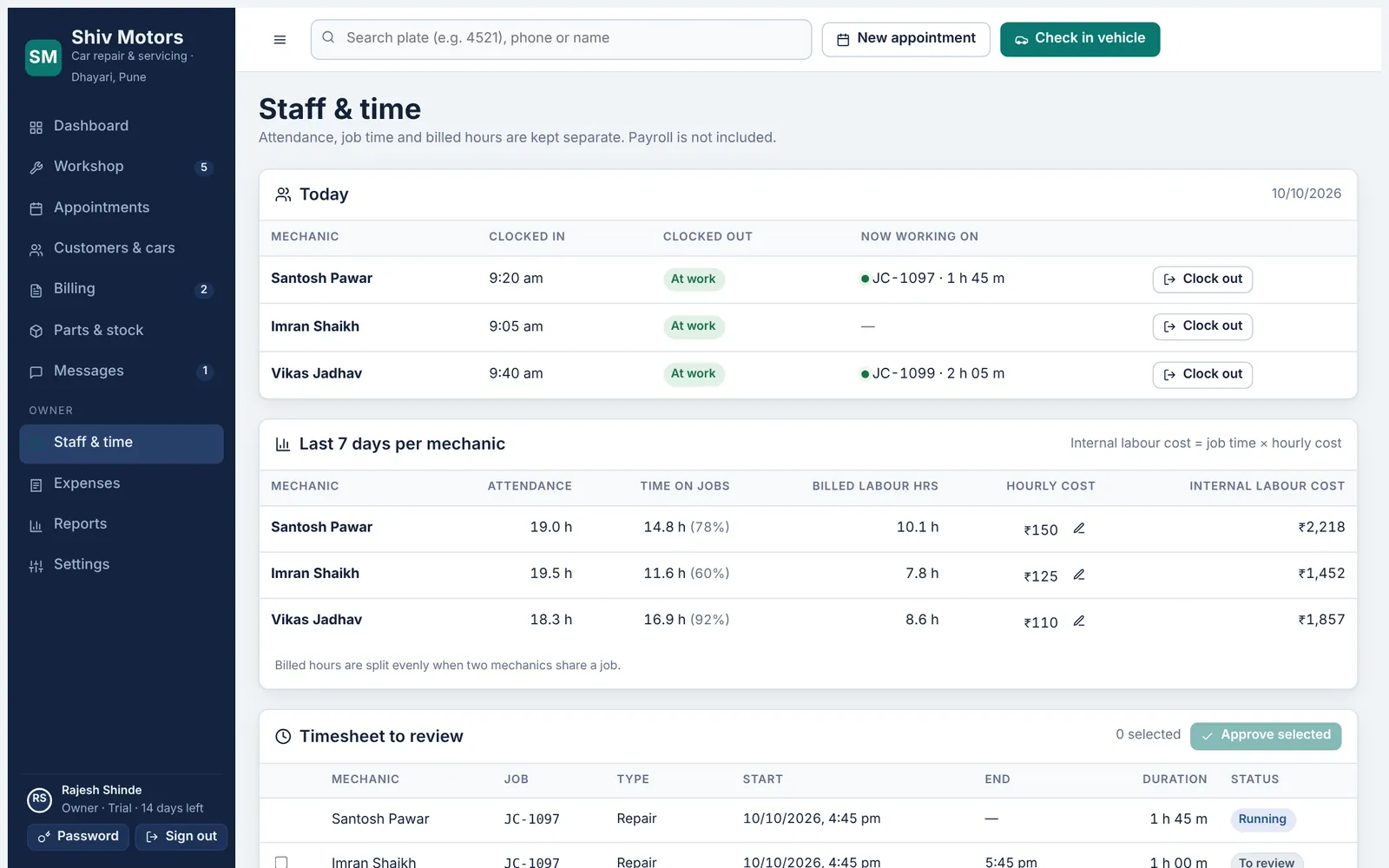
Mechanics clock in when they arrive and start a timer on the job they are working on. Attendance, actual time on each job and the hours you bill the customer are tracked separately, so you can compare them. The owner approves time entries, and the mechanic’s hourly cost turns actual time into a real labour cost per job.
Clock in and out. Attendance from the mechanic’s phone, with time at work today.
Job timers. Start and stop a timer on each job. Inspections stop their timer on submit.
Approve time. The owner reviews and approves finished time entries.
Timesheets. Hours per mechanic per day, ready for wages.
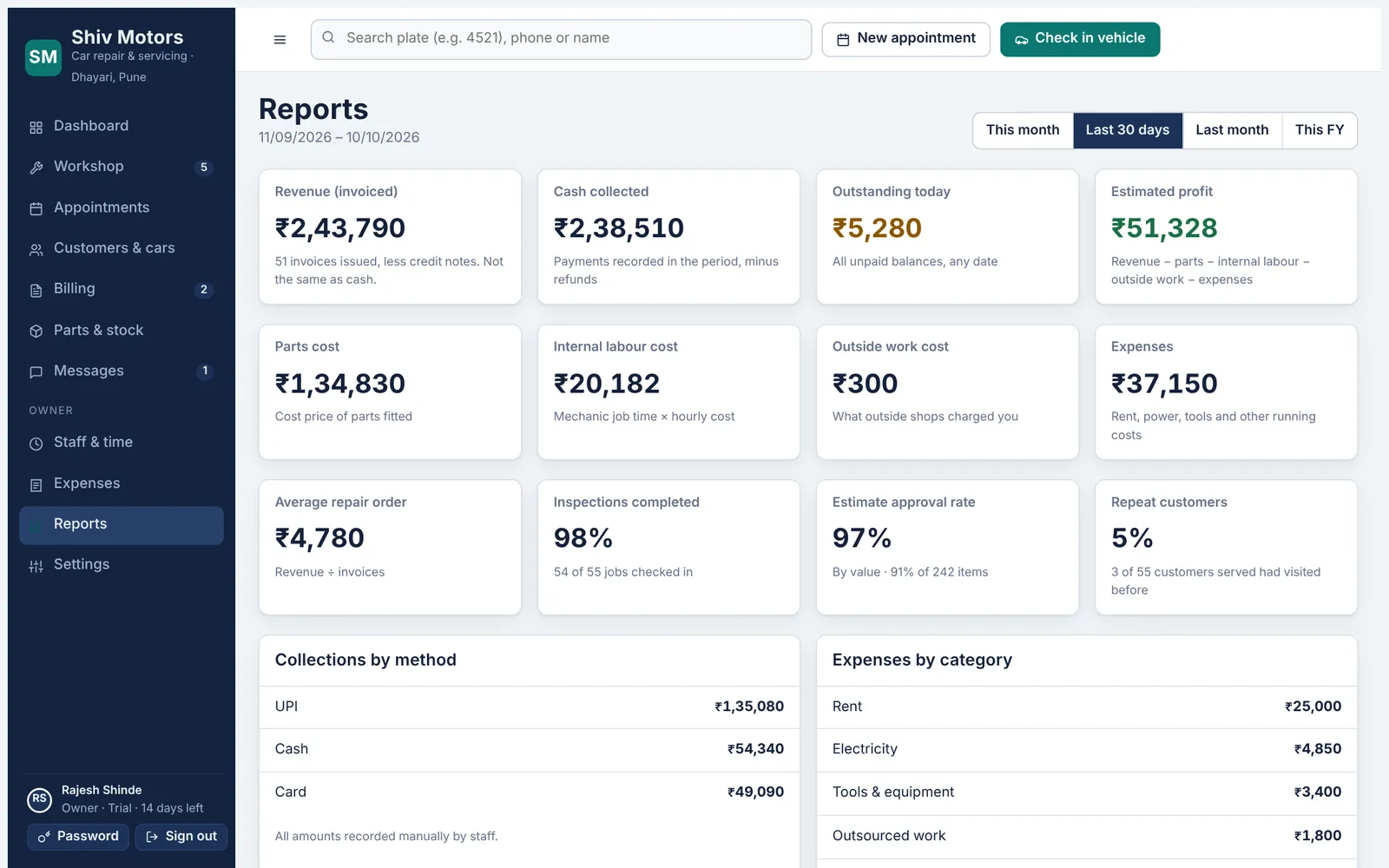
Pick this month, the last 30 days, last month or this financial year and see revenue invoiced, cash collected, what is outstanding today and an estimated profit after parts, labour, outside work and expenses. You also see average repair order, how many jobs were inspected, how much of the estimated work customers approved, and how many customers came back. Record expenses by category so the profit figure is real.
Revenue and cash. Invoiced revenue, net of credit notes, and cash actually collected.
Outstanding. Every unpaid balance, whatever the date.
Estimated profit. Revenue minus parts, internal labour, outside work and expenses.
Approval rate. How much of the estimated work customers approved, by value.
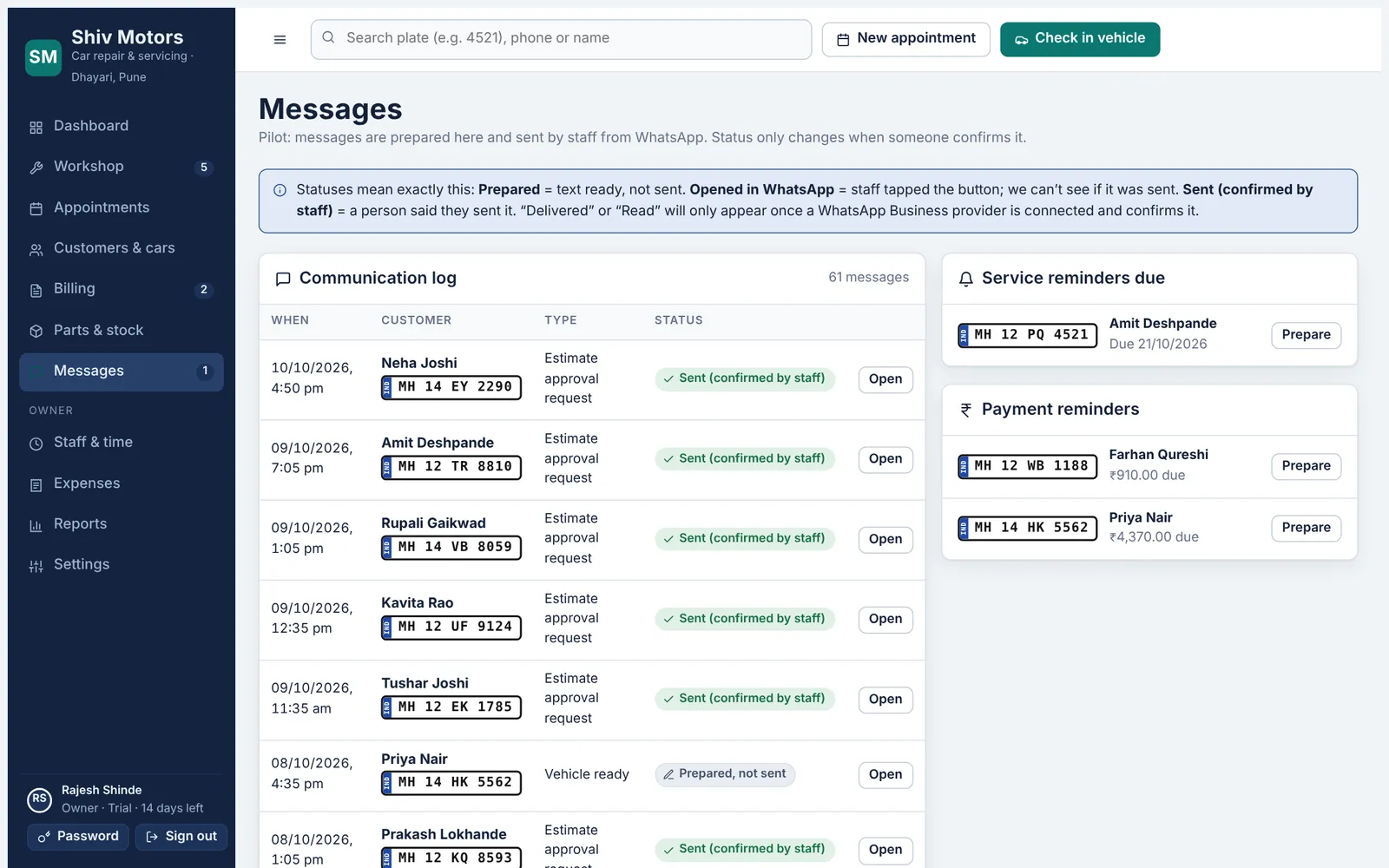
At handover the next service date and kilometre target are saved on the car. Cars that are due show up for a reminder, and the app prepares the WhatsApp message with the customer’s name, car and your garage details. Messages for appointment confirmation, estimate, car ready, invoice and payment due are prepared the same way, and every message is logged on the customer with its status.
Next service on every car. Date and kilometres, set at handover and editable any time.
Due list. Cars due for service are listed so nobody is forgotten.
Prepared messages. Appointment, estimate, ready, invoice, payment due and reminder messages.
Opens WhatsApp. The message opens in WhatsApp filled in; you press send.
Give everyone a login without giving away your numbers.
The owner adds service advisors with a password and mechanics with a PIN. Advisors run the front desk but do not see costs, expenses or reports. Mechanics see only their assigned cars and never see prices or customer phone numbers. Deactivating someone signs them out everywhere at once. Every change is recorded in an audit log, and each garage’s data is kept separate and checked on the server for every request.
Three roles. Owner, service advisor and mechanic, each with its own permissions.
Mechanic PINs. 6-digit PINs; obvious PINs like 123456 are refused.
Account lockout. Five wrong passwords or PINs lock the account for 15 minutes.
Instant sign-out. Deactivated staff are signed out on every device immediately.